Timeline · for Keira's clients
Your photo day, in order.
A photo-day timeline your whole team can actually see: who's in each shot, who's covering it, and when. Built by your photographer, for whatever she's shooting. Free while we figure it out.
A peek inside · real screens, phone-first
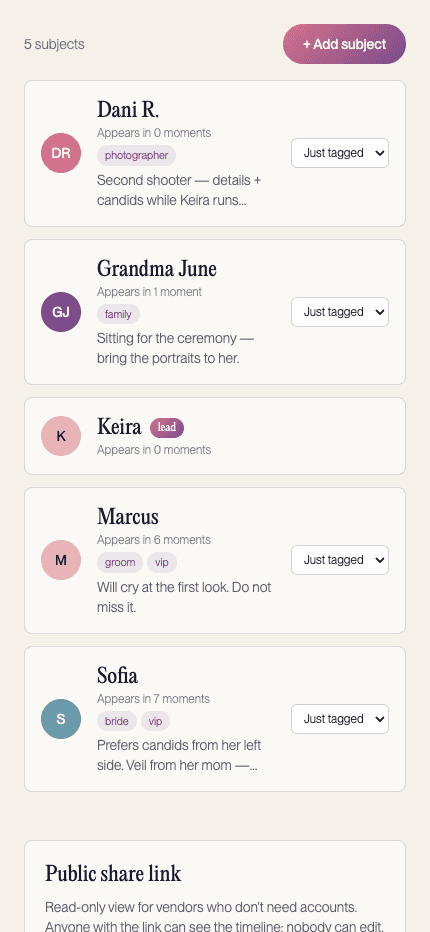
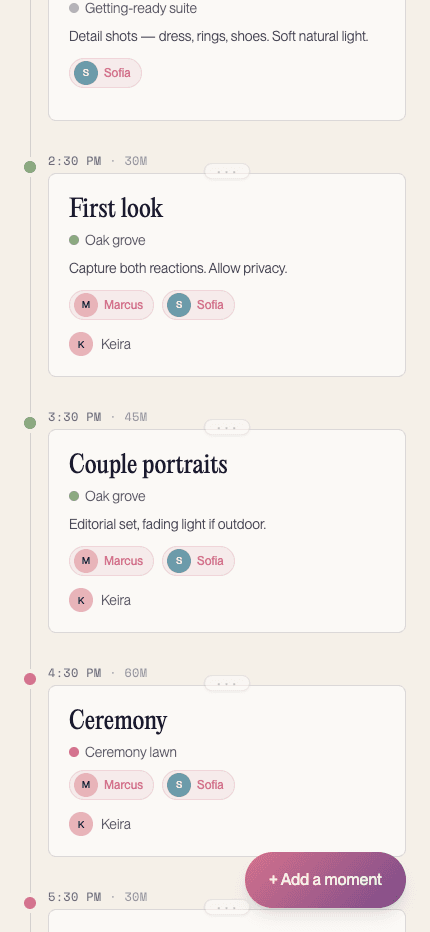
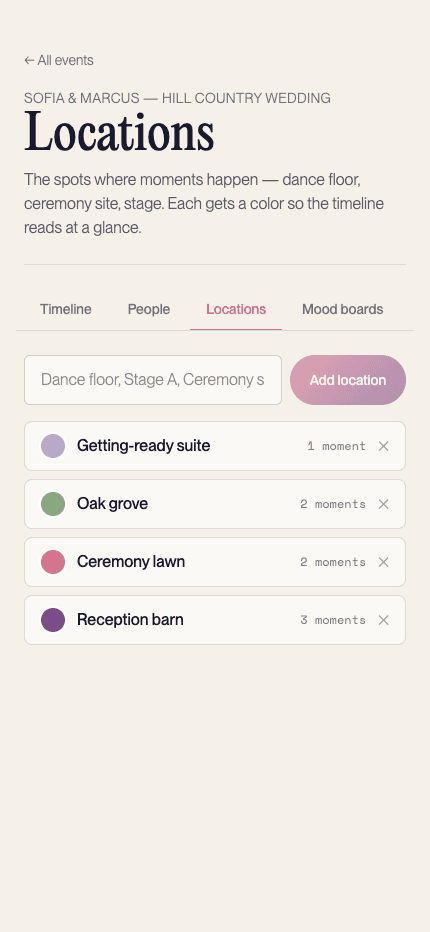
The group-chat method wasn't cutting it
You know the drill. The schedule lives in a Google Doc nobody opens, the “who's in the group photos” list lives in someone's head, and your photographer finds out about the schedule change in a text at 9pm. Every change spawns three messages, and on the day, somebody's working from the old version.
A photo-day timeline should be one thing, in one place, that stays true when plans move. That's the whole idea here.
What goes in a photo-day timeline
Moments, pinned to the clock
Not “early afternoon,” but 3:40pm, twenty minutes, portraits at the oak grove. Each moment gets a time, a duration, and enough notes that nobody has to ask. Durations matter as much as start times: when every moment knows how long it runs, the whole day's math holds instead of quietly colliding.
The people in the shot
Every moment lists who needs to be in front of the camera, so the guest of honor isn't across the room when the group shot happens. Add photos and notes so the team recognizes faces on sight, and tag people (family, vip, speaker) so the big group moments don't depend on anyone's memory.
The people behind it
Assign each moment to your photographer, second shooter, or videographer. When two things happen at once (details upstairs, guests arriving downstairs), the coverage plan is explicit, and everyone knows what they're covering before they ask.
Places, color-coded
Ceremony site, main stage, that staircase everyone loves. Locations get colors so the day reads at a glance, even on a phone screen in a packed room.
How it works
01
Drop in your moments
Start from a template (wedding, corporate, or family) or a blank page. Whatever the day holds, pin each moment to a time and drag to retime. We'll keep the order.
02
Pull in your photo team
Invite by email. They see the plan, you control who can edit. No accounts needed for vendors; send them a read-only link.
03
Open it on the day
Phone-friendly. Signed-in folks see changes as they happen, so a last-minute schedule change actually reaches the person holding the camera.
Built for the people actually holding cameras
Template PDFs are fine until the day moves. Then they're wrong everywhere at once. This timeline is live: when the schedule slips fifteen minutes, your signed-in photo team sees it slip, and share-link viewers get the current plan every time they open it. It's built by a working Austin photographer and it comes with your booking, not as another app to shop for. Mood boards, a shareable read-only link, and calendar subscriptions are in there because they're the things we kept needing on real shoot days. Planning a wedding specifically? The stress-free wedding day guide pairs well.
No app to install.
It's a web page. Sign in with a magic link from your email. No password to invent, no download.
Phones first.
Designed for one hand at a venue, not a desktop at a desk.
Your photographer's already in it.
This isn't a tool you onboard your vendors onto. It arrives with your booking, sketched and ready.
Every kind of day Keira shoots
Weddings and elopements, corporate events (keynote, sessions, headshots), family sessions, brand shoots. The tool works the same way for all of them: anywhere a photo team and a schedule have to survive contact with real life. Templates for the common ones are one tap away.
Questions clients actually ask
- What is a photo-day timeline?
- A photo-day timeline is four things on one page: your day's moments with clock times, how long each runs, who's in each shot, and who's covering it. Get those four down and stop there. That's the whole document.
- How far in advance should we build our photo timeline?
- Two to three weeks out is when most clients lock it in: late enough that plans are real, early enough that the photo team can prep. Start rough as soon as your event has a start time, and let it stay a draft until the final month.
- Can my planner and photo team see it?
- Yes. Invite anyone by email and choose what they can do. Viewers see the plan; editors can adjust moments; co-leads run the day with you. The help page walks through each access level.
- What kinds of events does it work for?
- Anything Keira shoots: weddings, corporate events, family sessions, and brand shoots. Templates exist for the common ones, and multi-day events are supported, so a two-day conference or a wedding weekend reads as one timeline.
- What does it cost?
- Nothing. It's a free tool Keira offers her clients to help shoots run smoothly, and it comes with your booking. It's the same timeline we'd be building for your day anyway; now it just lives where everyone can see it.
- Do my vendors need accounts?
- No. Generate a read-only share link and send it to anyone: caterer, DJ, venue coordinator. They see the timeline; they can't change it; you can revoke the link anytime.
- Can I get the timeline in my own calendar?
- Yes. Grab your subscription URL and your calendar app does the reminding. Apple Calendar and Outlook add it instantly; Google wants the URL pasted into its calendar settings. Once it's in, every photo moment stays current as plans move.
Put your day in order
Set it up now, thank yourself at golden hour. Questions first? Get in touch.
Start your timelineHeads up: this is built for Keira's clients. If you're here and you don't know who that is, start here.