
The text came in while I was swapping lenses.
I was shooting a thousand-person corporate event, the kind with a run of show thick enough to staple. I'd just wrapped the keynote and was back at my equipment case transitioning to happy hour coverage when my phone buzzed: I was needed backstage, immediately, for a VIP meet and greet with the speaker.
It wasn't on my run of show. It hadn't come up on the pre-event call either, and not because anyone dropped the ball. The meet and greet was green-lit a few days out, long after that call, and it came together too fast to make it onto the master spreadsheet I'd been handed in the lead-up. I got lucky: I saw the ping, I already had a light staged and ready for happy hour, so I grabbed it and made it backstage with almost no delay.
But luck isn't a system. The real problem was that the event had more than one timeline. I was working from the media team's version. The meet and greet lived on the marketing team's version. Both teams were doing their jobs perfectly well. The two documents just never met, and the photographer sat downstream of both. If those teams had been editing one shared timeline, one that fed straight to the people holding cameras, a last-minute addition three days out would have simply appeared on my schedule. No text, no sprint, no luck required.
Weddings have the same disease with different symptoms. Nothing gets green-lit late at a wedding, but everything moves: hair and makeup runs thirty minutes over, the ceremony starts late, the toasts run long. And every time it happens, four vendors quietly pull out the same spreadsheet and do the same arithmetic. Okay, we're twenty minutes behind, so the first dance is now 8:20, so I need to be in the ballroom by 8:15. And then everyone hopes everyone else did that math the same way. Three group chats and a stale spreadsheet is no way to run a shoot day.
So I built something. It's called the Timeline tool, it lives right here on this site, and every one of my clients gets it with their booking, whether I'm shooting their wedding, their conference, or their family session. It manages the thing this article is really about: the photo-day timeline, which I'd argue is a different document than the planning timeline most advice online describes. Let me make that case, then show you the tool.
What is a photo-day timeline, really?
A photo-day timeline is the schedule of your day's moments, each pinned to a clock time, with the people involved and the person covering it. That's the whole definition. It's the working document your whole day runs on, not a decoration for your planning binder. Weddings are where it earns its keep hardest, but a corporate day or a family session lives or dies by the same thing.
The difference between a timeline that works and one that doesn't isn't prettiness. It's whether it answers three questions without anyone having to text anyone: what's happening at 3:40, who needs to be standing there, and who's holding the camera.
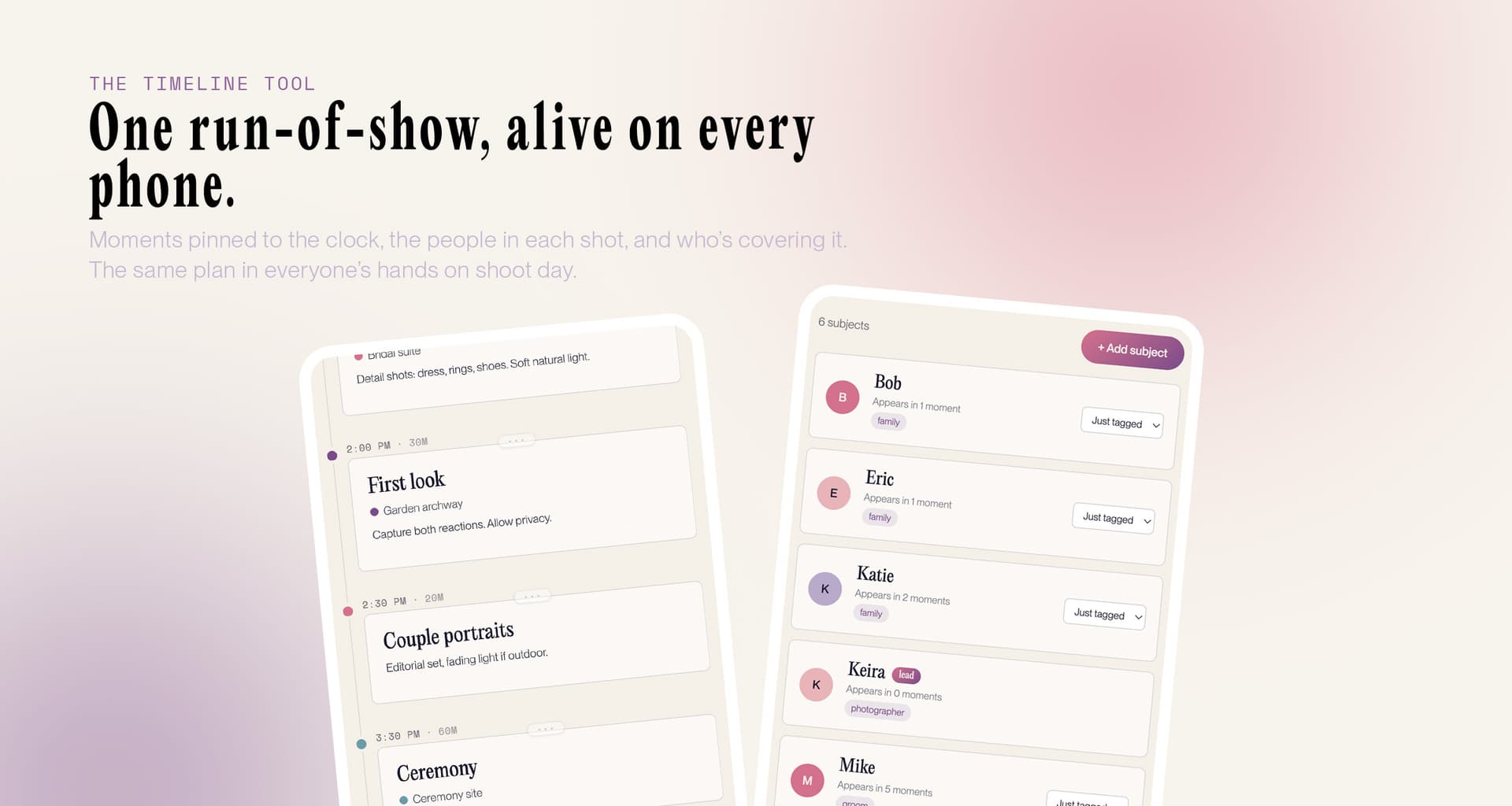
A real timeline: every moment pinned to a time, with the people in the shot and who's covering it.
Why timelines break
After a decade of Austin weddings, galas, and family sessions, I can tell you exactly where timelines go to die. Weddings are the hardest case, so most of my examples come from there, but the failures are the same at any shoot.
They go stale. The PDF was accurate when it was exported. Then the florist got stuck on MoPac, the ceremony slipped fifteen minutes, and now every copy in circulation is confidently wrong. Paper doesn't update; neither does a PDF in a text thread.
Nobody knows who's in the shot. "Family portraits, 5:00" is not a plan. Which family? Both sides? Grandparents seated or standing? The list of who belongs in each photo usually lives in exactly one person's head, and that person is busy getting married.
The team can't see changes. Your planner knows the cake moved to 8:30. Your photographer is across the venue photographing the cake table that's about to be moved. The information exists; it just can't travel fast enough through humans relaying texts.
There's more than one of them. This is the corporate failure, and it's the worst one, because nobody involved can see it happening. Two departments each keep a run of show, each one accurate about the part of the day they own, and neither knows the other has a version. Whichever one reaches the photographer becomes the truth as far as the photographer is concerned. Weddings get a milder version of this whenever the planner's timeline and the couple's timeline drift apart.
None of this is a people problem. Everyone's doing their job. It's an information problem: the plan has no single home.
The light math (start here)
Here's the part most timelines get backwards. For any shoot with outdoor portraits, whether it's a wedding, a family session, or an engagement, they're built around the venue's schedule, when they should be built around the sun's.
The hour before sunset is the portrait window: warm, low, forgiving light that makes everyone look like themselves on their best day. So when clients ask me where to start, my answer is the same across the board: look up your sunset time first (timeanddate.com has every date), then work backwards.
The backwards math goes like this (I'll use a wedding, since it's the most demanding version of the problem). Couple portraits want 15 to 30 minutes. Fifteen is genuinely enough for one beautiful setup, and I'd only book the full thirty if portraits are a real priority for you or you want more than one backdrop; longer than that is usually you missing your own party for diminishing returns. You want them wrapped a few minutes before the light actually dies, so a 30-minute session starts roughly 40 minutes before sunset, and a 15-minute one starts around 25. Add a 15-minute buffer to pull two people out of their own party (it always takes 15 minutes; someone is mid-hug). If you're skipping a first look, family formals and wedding party photos also have to land in that back half, so your ceremony needs to end an hour and a half to two hours before sunset for the math to hold, depending on how long your family-photo list is. With a first look, most of it moves before the ceremony and the evening relaxes.
In Austin, this changes more across the year than people expect. A mid-October wedding has sunset just before 7pm: lovely, civilized, and a 4:30 ceremony works. That same venue in late November? Sunset around 5:30, and if the ceremony starts at 4:30 you've scheduled your portraits into the dark. June swings the other way: sunset near 8:35 means dinner can happen before sunset portraits, which nobody believes until they see it on a timeline.
The first look is the biggest lever in all of this, so let me be plain about the trade. With a first look, portraits, wedding party, and most family formals happen before the ceremony, while everyone's fresh and the schedule is still obeying you. Without one, all of it compresses into cocktail hour. Doable, but it means you attend roughly none of your own cocktail hour, and one late-running toast can eat your portrait window. I don't push couples either way; I just make the timeline show the consequence of each choice, in clock time, before anyone commits.
None of this is exotic knowledge. It's arithmetic. But it's arithmetic almost nobody does, because the sunset number lives in one app, the schedule in another, and the two never meet. Put them on the same page and the whole day snaps into focus.
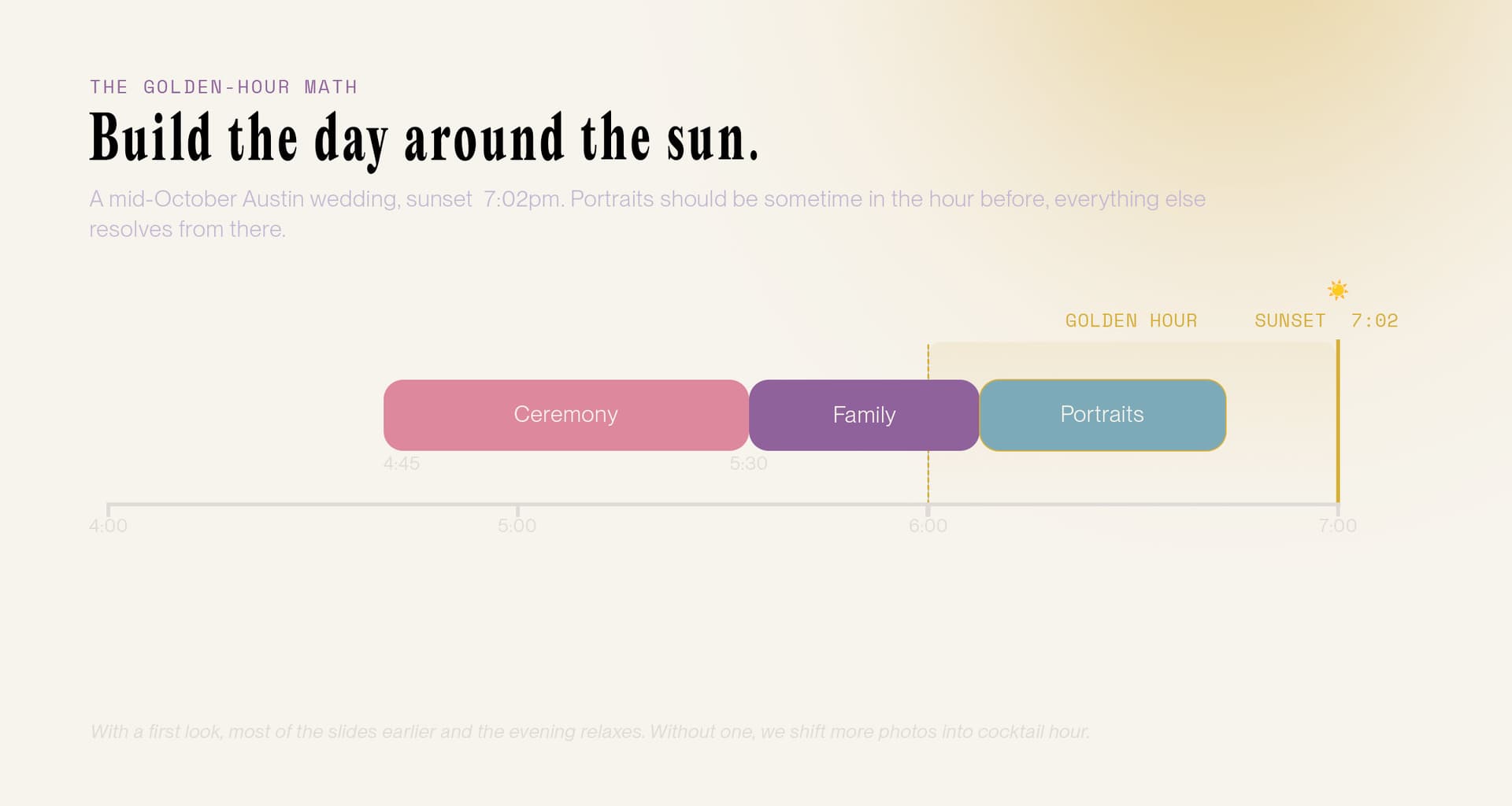
Sunset sets the anchor. Portraits land in the hour before it; everything else back-solves from there.
What else a photo-day timeline needs
Once the light is anchored, the rest of the document is lists that talk to each other, and each one exists because I've watched its absence break a shoot day.
Every moment needs a duration, padded. "First look, 3:40" is half a plan; "First look, 3:40, twenty minutes, then ten to walk back" is a plan. Everything takes longer than you think: the walking, the gathering, the one-more-handshake. Buffers are what keep one late florist (or one over-running keynote) from cascading into missed portraits at 7pm.
Every moment needs its people. Family formals stop being an archaeology dig when "both sets of parents + siblings" is written on the moment itself, where the person rounding everyone up can read it.
And every moment needs its coverage: me, my second shooter, the videographer, or some split of us. When details are being shot upstairs while guests arrive downstairs, that assignment is the difference between "covered" and "assumed."
Clock times, light, durations with buffer, people, coverage. That's the whole anatomy. Get it onto one page and you're ahead of most shoot days I've walked into.
So I built the Timeline tool
Here's the announcement part. The Timeline tool is a little web app where we build that plan together and it stays alive.
You drop in moments, or start from a template (wedding, corporate, family) and adjust. Every moment carries its time, duration, location, who's in front of the camera, and who's behind it. Drag anything to retime it. Invite your planner and photo team by email and choose what each person can see or change; give vendors a read-only link, no accounts required. Subscribe your own calendar and the plan rides along wherever you already look. And your mood board lives in here too, attached to the moments it belongs to, which is worth a section of its own.
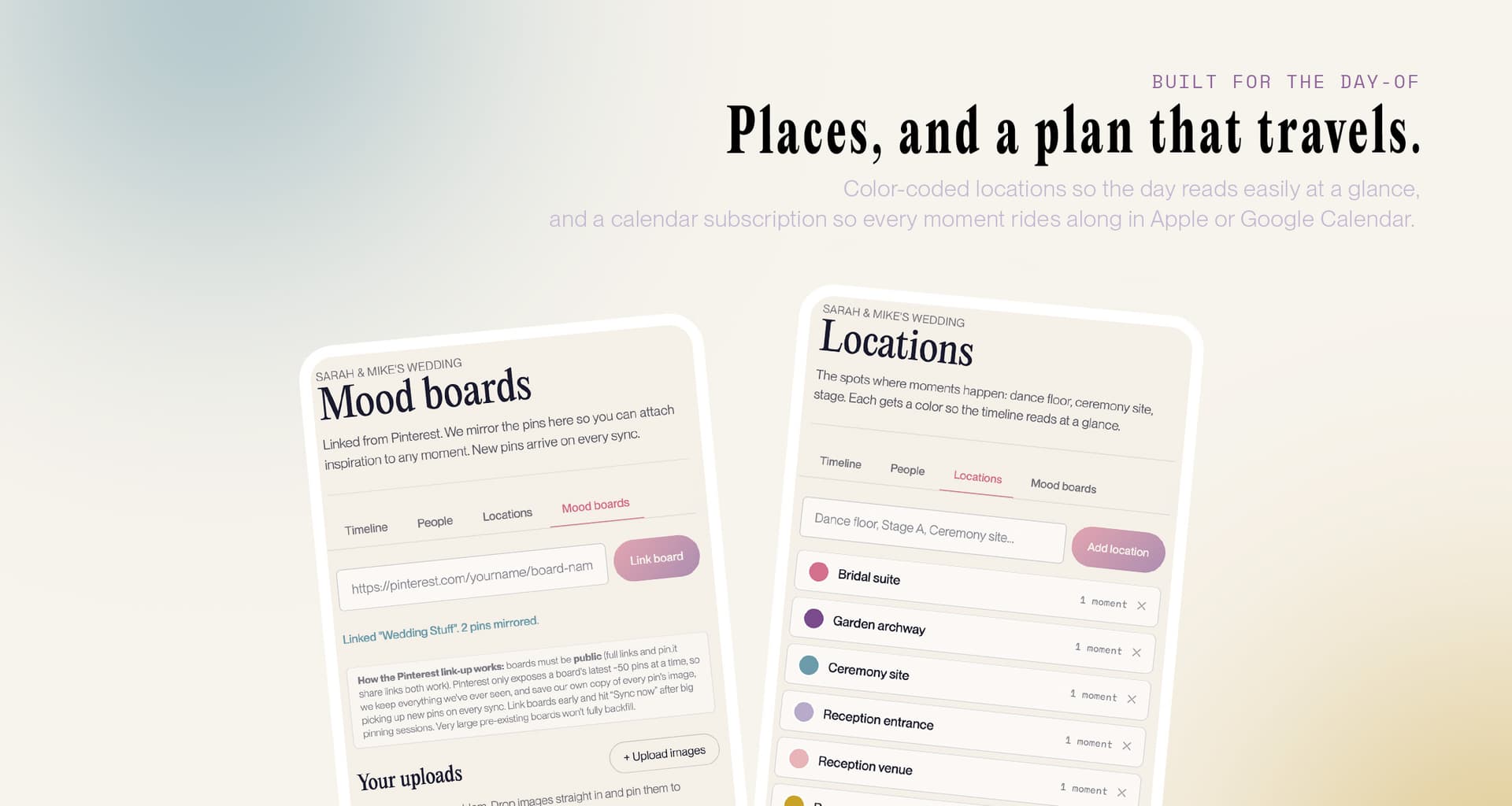
Color-coded locations so the day reads at a glance, and a calendar subscription so every moment rides along.
The point isn't features. It's that the run of show finally lives somewhere. The same document that holds your start time holds your light math, your must-have shot lists, and your videographer's assignments, and it's the version everyone means when they say "the timeline."
And when something changes on the day, because something always changes on the day, everyone signed in is looking at the same updated timeline within seconds, and anyone holding the share link opens it to the newest version. The backstage sprint that started all this doesn't happen, because the change doesn't need a relay chain. Neither does the twenty-minute delay that four vendors would otherwise each do the math on alone.
It's free. It's a tool I offer my clients to help our shoots run smoothly, and it comes with your booking.
Mood boards, attached to the moment they belong to
Most clients arrive with a mood board, which is a genuinely good thing. It's also where a surprising amount of shoot-day time quietly disappears.
The problem isn't the board, it's the shape of it. A mood board is fifty images describing eight different setups, and on the day I'm standing in front of you scrolling through it, trying to work out which four of those fifty were the ones you meant for this setup. That's a few minutes lost, over and over, at the exact points in the day where nobody has a few minutes.
So in the Timeline tool, inspiration attaches to the moment it belongs to. Pull images in from Pinterest (paste a board link and it syncs) or upload your own, then pin specific images to specific moments. The full board still lives in one place. Each moment just knows which pictures are its pictures.
Branding content days are where this earns its keep hardest. A brand shoot is really six or eight mini-shoots stacked into one day: the clean headshot setup, the working-at-your-desk set, the product detail shots, the loose candid frames for social. Each has its own look, and they're often nothing like one another. When you've tagged the three references that belong to the desk set, I open that moment on the day and see exactly what we agreed on, without scrolling past forty images meant for a different setup. If you're planning one, the brand shoot planning guide walks through the rest.
It works the same way at a wedding: pin your two must-have portrait references to the portrait block and they're there when we get to it. But the more segmented the day, the more this saves.
How we'll use it for your day
If you book with me, here's the rhythm. After our planning call, you'll get an invite to your event with a starter timeline already sketched, light math included. You fill in the personal parts: who's in the group photos, the moments I'd have no way to know about. Your planner or coordinator gets edit access if you want; your partner too (or not; some clients keep one editor and it's honestly cleaner).
People ask when the timeline should be "done," and my honest answer is: it's a draft until about two weeks out, and that's fine. Rough it in as soon as your event has a start time, so the light math gets checked early enough to shift things while they can still shift. Then we tighten everything together in that final stretch, once vendors are confirmed and travel times are real. A timeline finished four months early is just a PDF with extra steps. The value is in it being current, not early.
Who sees it is yours to decide, and in practice most clients land in the same place: the photo team and planner can edit, family or key people get view access or just the shared link, and the venue coordinator gets the link the week of. Everyone sees the same day; only a few hands can move it.
On the day, it's open on everyone's phone, and it's simply true all day long.
If you're planning a wedding specifically, the stress-free wedding day guide pairs well with this. And if you're still choosing your photographer, here's how I'd think about that, tool or no tool.
See you at golden hour
The Timeline tool is live: start your timeline, poke around the help page for the full tour, or get in touch and I'll walk you through it. Your day deserves better than three group chats. Now it has it.